How Does it Work?
Subject teachers are able to enter subject references for students, this makes that information available to the person responsible for writing the final UCAS reference (or personal reference, in the case of students not applying to university). Along with their reference, the system also stores (and can import from your own systems) students achieved and predicted grades in their subjects, to provide as much relevant information as possible to the person who writes the final reference.
References are stored in a central database, accessible via a web interface that allows staff to access the system from within school, at home, or indeed at any location with an internet connection. Once in the system; the references are securely stored, accessible by other staff members, and automatically archived each year, to allow staff to recall previous year’s data in the case of providing professional references for ex-students.
In addition to this, URMANT provides easy overview screens, allowing relevant staff to access information such as what students have submitted their UCAS applications, what subject references have not yet been written, and what students have not yet had a UCAS reference written for them.
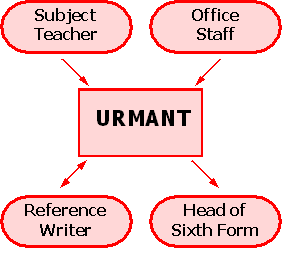
What Does it Do?
1. Writing Subject References:
- A subject teacher decides to write a subject reference for one of their students.
- The subject teacher enters the reference onto URMANT, having selected the student and subject it relates to.
- The subject teacher can refer to any details about the student stored in URMANT, including their achieved and predicted grades and any references written by other staff.
- The reference is checked by URMANT for spelling problems and that it is of an appropriate length.
- The reference is then saved within URMANT, either as a final (“Confirmed”) reference, or a draft.
2. Receiving Student’s Application:
- A student wishes to submit their UCAS application, generally they first hand this to the school, who submit the document along with the UCAS reference written by the school.
- Office or administration staff locate the student within URMANT, and mark that their application has been received.
- The student is now flagged as requiring a UCAS reference.
3. Writing UCAS References:
- The UCAS reference writer wishes to consolidate the information in the subject references into a single reference to be submitted to UCAS or stored as a professional reference should the student ever request one.
- The reference writer enters the reference into URMANT, again they have easy access to the reference written by other members of staff, as well as the student’s grades and enrolment information.
- The reference is then stored as a draft within URMANT, until the reference writer checks it and marks it as ready.
- Combined with the student handing in their application, this then flags the student’s application as ready to send to UCAS.
4. Sending a UCAS Application:
- Once all the required information has been entered into URMANT, the head of sixth form or administrative staff are then able to see students whose application is ready to send.
- They select the student, and are then able to mark the application as sent within URMANT, and copy and pastethe required information from URMANT into the online UCAS system.
- Changes to the students references are then locked, to avoid confusion unless the application is withdrawn from UCAS.
